
Table of Contents
How to Download the App
> iOS (App Store)
> Android (Google Play Store)
What Is the Mobile App?
The IMMERSE mobile app is a brand-new, native application built from the ground up for iOS and Android. It replaces the previous browser-based mobile method and delivers a faster, more intuitive experience designed specifically for learning on the go.
Unlike the old approach — which required opening IMMERSE through a mobile browser using NVIDIA cloud streaming — the native app is a standalone download from the App Store or Google Play Store. That means quicker load times, smoother navigation, and a purpose-built interface optimized for your phone.
The mobile app is where you will primarily use IMMERSE's newest feature, Capture, which turns real-life moments into something you can actively learn and later study from. You can still access self-paced learning, review tools, and account settings, while more immersive experiences like Live Classes and Community Scenes remain available on Browser and VR.
How to Download the App
⚠️ To log in to the mobile app, you must have an active account and subscription or license. You cannot create accounts or subscriptions from the mobile app.
🎯 Don't have an account or still need to subscribe? See Account & Subscription Setup or Account Registration for Corporate Learners.
iOS (App Store)
- Open the App Store on your iPhone.
- Search for "IMMERSE: Language Fluency".
- Tap Get, then Install.
- Once installed, open the app and sign in with your IMMERSE credentials.
Android (Google Play Store)
- Open the Google Play Store on your Android device.
- Search for "IMMERSE: Language Fluency".
- Tap Install.
- Once installed, open the app and sign in with your IMMERSE credentials.
Mobile App Features
The mobile app is primarily where you will use Capture. You can record or snap moments from your phone and receive personalized practice based on what you captured.
👓 Have AI Glasses? Connect them to the app to practice language during real experiences. See Pairing AI Glasses to the Mobile App
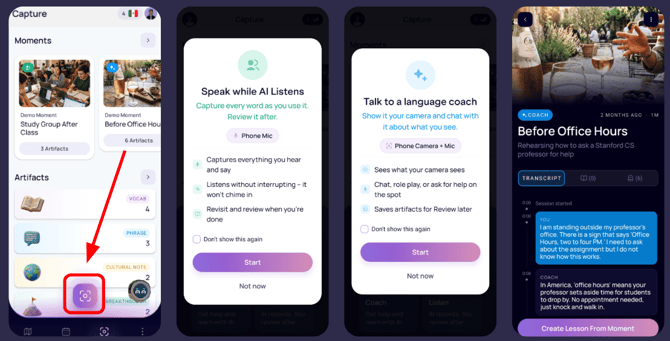
Beyond Capture, you can also quickly and easily access the Learning Path to take AI lessons, the Schedule page to review and book live classes, the Review page to review your notes, and the Profile page to update your settings and preferences, all from the convenience of your mobile phone!
✅ Available on Mobile
- Self-Paced Lessons — Continue your AI-powered learning path.
- Live Class Schedule — View, book, and cancel Live Classes with your Pro membership. (Pro feature only)
- Capture Feature — Record moments and receive personalized study material.
- Artifacts & Threads — Review vocabulary, phrases, cultural notes, and patterns from your captures.
- Personalized Lessons — Create Practice, Culture, Lecture, and Roleplay activities from captured moments.
- Review — Create your own notes or review and organize notes sent from past Live Classes you’ve attended.
- Account Settings — Manage your profile and subscription preferences.
❌ Not Available on Mobile (Browser & VR Only)
- Joining Live Classes — Attend instructor-led sessions with other learners.
- Community Practice Scenes — Open-world locations to practice with AI Conversation Partners or other learners.
- Avatar Customization — Full avatar editing.
- Virtual World Settings — Advanced audio and movement configuration. See Configuring In-App Audio Settings.
- Virtual World Tutorials — Explore controls before entering a Live Class or Community Scene. See New User Tutorials.
ℹ️Push Notifications
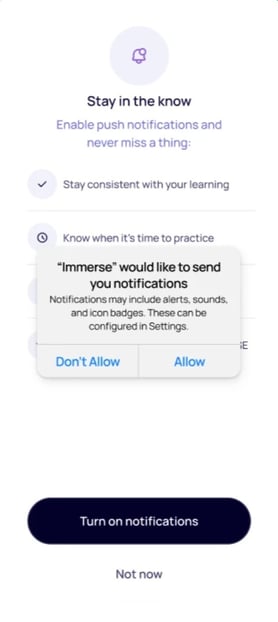
Enable push notifications to receive class reminders and study alerts on iOS and Android. This setting can be configured from your IMMERSE Profile and within your device settings at anytime.
❓If you run into any issues downloading or using the mobile app, we are here to help. Contact our support team through the Help Center support beacon or email support@immerse.com.