
Table of Contents
> Fill out a Ticket Form in the Support Messenger
Tracking Ticket Progress
> Ticket Statuses & What They Mean
All technology may occasionally experience glitches or may not perfectly meet your needs. If you find something that is broken or could be improved, please inform us. We want to remove any friction from your learning journey as quickly as possible.
Submitting a Ticket
To create a ticket and monitor its status, you can choose from a few options.
Message Us Directly
Email us directly at support@immerse.com with details of your issue and we will manually create a Bug or Feedback ticket for tracking purposes if it’s warranted.
Fill out Ticket Form on Support Messenger Icon
-
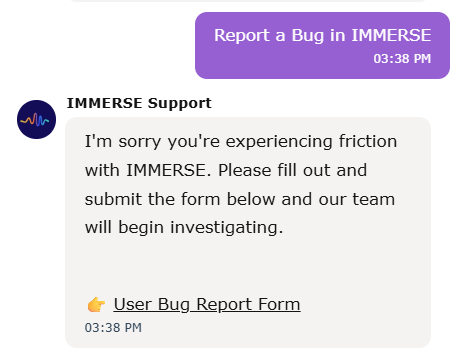
Open the Support Beacon on our main website, the WebApp, or the Help Center.
-
Click through the options to get to the ticket form:
-
Individual Learner Question > Yes I’m a current member
-
Choose Report a Bug in IMMERSE or Submit Feedback
-
Open the form, fill in the information requested, and submit.
-
Bugs & Product Issues
A bug is an error or flaw in a software program that causes it to behave in an unintended or unexpected way and can occur in any part of the IMMERSE platform including the main Website, the WebApp (for individuals), or the virtual world (both for computer and VR users).
What counts as a bug in IMMERSE?
Across all IMMERSE platforms, a bug refers to an issue with an existing feature that isn’t functioning as intended. Bugs often can't be resolved through standard troubleshooting steps and typically require a fix from our development team.
Examples of Bugs
-
Duplicate lesson tiles appearing in the Homeroom
-
Avatars sinking into chairs when attempting to sit
-
Language Assist tool not translating words
-
Spawning outside the scene boundary
What’s Not a Bug?
Some issues may look like bugs but are actually related to connectivity, user-specific scenarios, or limitations outside of our control. These usually can be resolved through troubleshooting or reported for manual correction.
Examples That Aren’t Bugs
-
Forever loading wheel: Likely a connectivity issue—try leaving and re-entering
-
Missed class email despite attending: Attendance is manually marked; this may be human error and is easily fixable
-
Mispronunciations in TTS (text-to-speech): A known limitation of the API we use—not something we can correct
-
GeForceNOW regional restrictions: These are determined by third-party partners—learn more here
Feedback & Requests
Feedback and requests refers to suggestions or ideas for improving the platform and our offerings—not bugs or malfunctions. When submitting your input to our team, there are three categories to choose from. The details for each are outlined below so you know which to select when filling out your ticket submission.
1. General Feedback
For broad comments or thoughts you might want to share about your overall experience with IMMERSE. This can include compliments, frustrations, or neutral observations that aren’t tied to a specific bug or request for change.
Examples:
-
“I love the new update! The Homeroom layout feels much more intuitive.”
-
“The new Meta Avatar’s movements are distracting when I’m trying to talk to them. It’s unnatural.”
2. Improvement Request
For when you think of an existing feature that could be enhanced, refined, or adjusted to better meet your needs or expectations. This feedback focuses on evolving or optimizing what already exists in IMMERSE, rather than adding something brand new.
Examples:
-
“Can you make it easier to navigate between Community scenes?”
-
“I want to be able to interact with more scene elements like the washing machine or closet.”
3. New Feature Suggestion
For when you want to propose something that doesn’t currently exist in IMMERSE or isn’t offered at all. These suggestions might stem from your own unmet learning needs, personal preferences, or comparisons to other tools or platforms.
Examples:
-
“Can you add a journaling space to the review tab where we can reflect on what we’ve learned after each class?”
-
“I would love to see a construction scene with heavy machinery and more tools/building materials in the future.”
4. New Language Program Request
5. Class or Lesson Feedback
For when you have something additional to add regarding a specific Self-Paced Lesson or Live Class that you didn’t include in the feedback surveys after Live class completion, or at the end of each module during Self-Paced lessons.
Examples:
-
" I’d like to see more classes for medical professions.”
-
"I wish the level 4 Self-Paced Lesson “Asking About Past Abilities & Limitations” talked more about things I wasn’t able to do before my current role/job. "
6. Instructor Feedback
For when you have something you’d like to express about one of our Live Class instructors that you didn’t submit in the post-class survey.
Tracking Ticket Progress
Ticket Statuses and What They Mean
-
📥 New – We’ve received your ticket and will review it soon.
-
🔍 In Progress – A Support Agent is actively investigating your issue
-
⏳ Waiting on Customer – We've sent you a response but need you to follow up by providing additional details or confirming that our suggestions fixed your issue.
-
🔺Escalated (Product or Lead) - A supervisor or engineer is reviewing your ticket in order to provide a solution.
-
👷 Pending Linked Ticket – The appropriate team is actively building or fixing the issue.
-
✅ Resolved – Your issue has been fixed.
-
🗃️ Closed - Your issue was resolved, the fix confirmed, and there were no further questions.
How Tickets are Prioritized
Bugs & Product Issues
Priority levels are assigned based on the severity of the issue and the impact it has on our customers. The higher the priority level, the faster the ticket will be resolved.
-
Urgent - Widespread Operations Halted
-
Critical issues causing (1) complete service unavailability, (2) security breaches or (3) widespread (impacting > 10 users) - rendering the core system functionality or service unusable.
-
-
High - Widespread Operations Affected
-
Significant issues with a "widespread" effect on core system functionality (but workaround can be present).
-
-
Medium - Non-Critical Issues
-
Noticeable issues that impact (some or all) user experience but do not halt operations.
-
-
Low - Small or Isolated Issues
-
Minor inconvenience, does not significantly impact productivity for guides or users. Negligible issue that has minimal impact on user experience or productivity.
-
Feedback & Requests
We prioritize feedback and requests based on several key factors:
-
Alignment with our educational mission and business strategy
-
Feasibility within our platform’s technical infrastructure
-
Impact on the broader community of learners and instructors
-
Our internal team's expertise and available resources
Once submitted, your feedback is reviewed by our support and product teams. We then share the most relevant items with the appropriate departments for deeper consideration. From there, all teams work together collaboratively to make the final decision on whether something can—and should—be added to the platform.
If we determine that we won’t be moving forward with your suggestion or request, we’ll do our best to notify you with the reasoning behind that decision. Even if something can’t be implemented right now, it still helps us understand what matters most to our users.
Frequently Asked Questions
Should I use the bug report or feedback form if I have an account or billing issue?
-
No thank you. Please email our support team directly with the details of the issue you are experiencing. Most issues are quickly resolved! If the problem is determined to affect multiple accounts, we will create a bug ticket that you can use to track the resolution.
❓If you're unsure what kind of ticket to submit or are missing information, email us at support@immerse.com.