
Table of Contents
Push Notifications
⚠️ Only available in English, Spanish, and Portuguese (BR) at this time. Users with operating systems in other languages will default to receiving English notifications.
Web
On computer browsers, approved sites or applications can send notifications to your device. These typically pop up in a bottom or top corner depending on your device settings.
Granting Notification Permissions
- Click the settings toggle or lock icon on the left side of your URL search bar
- Toggle on Notifications
- Refresh the page
.webp?width=670&height=380&name=image%20(2).webp)
If Notifications aren’t visible in this view:
- Click the 3 dot menu in the top right of your browser
- Scroll down to Settings
- Click > Privacy and Security (Chrome) or Privacy, Search, and services (Edge)
- Click > Site Settings (Google) or All sites (Edge)
- Change Notification permissions to Allow for immerse.online
- Refresh the app.immerse.online page so the change takes effect
Managing Notification Permissions
To turn off web push notifications, follow the same steps as above and toggle the setting off for immerse.online.
Mobile
On your first visit to the Learning Path in the Mobile App, you’ll see a pop-up notification prompting you to opt in to Push Notifications.
Notifications may include prompts to reengage with your learning or reminders about a Live Class starting soon. You can toggle these off at any time from your IMMERSE profile settings.
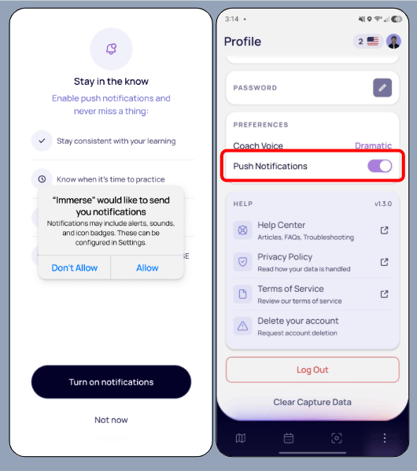
ℹ️ Configure how notifications appear on your device within your device settings.
Email Notifications
By creating an account with IMMERSE, you join our mailing list to receive app updates, feature announcements, subscription and live-class notices, and IMMERSE news.
This mailing list is independent of your membership or push notification settings, meaning you might receive emails even if you don't currently have an active subscription.
⚠️ IMMERSE notifications are sent from noreply domains. Any replies to these emails will either not be seen, or come through to our Support Help Desk.
- noreply@info.immerse.online
- noreply@hello.immerse.online
Unsubscribing
If you do not want to receive these updates, you can remove yourself from our mailing list with these instructions:
- Go to your email inbox and search for "IMMERSE."
- Find any email sent to you from The IMMERSE Team.
- Scroll to the bottom of the email and click on the "Unsubscribe" text link.
- You are now unsubscribed.
❓Questions about or have an issue with notifications? Send our team an email at support@immerse.com for help.