
Table of Contents
Adding Personal or Business Details to Invoices & Receipts
Using Professional Development Stipends
> Employer Purchased Gift Cards
Adding Personal or Business Details to Invoices & Receipts
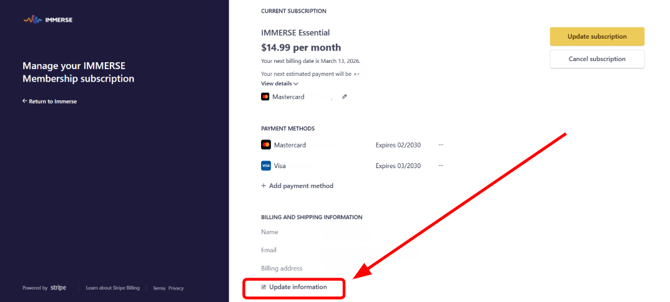
If requested by your employer to include the company information on the invoices/receipts, such as the business name, address, phone number, email, and other relevant details, you must add this information to your Stripe account under billing details following these steps (or contact support with the relevant information):
- Log in to your existing IMMERSE account on Computer or Mobile
- Click on your Profile Icon.
- Click > the pencil icon in the Subscription box
- Click > Manage Subscription
- Click > Continue, to open Stripe billing in a new tab
- Click Update Information on checkout window under Billing and Shipping
- Fill in Employer Business Name, address, phone number, employee ID number if needed, Tax ID, and email if different from the account.
Using Professional Development Stipends
Many employers and organizations provide a Professional Development (PD) stipend to help employees pursue ongoing learning. Language learning is a particularly valuable area for development due to its wide range of advantages. These advantages include:
- Improved cross-cultural communication
- Better collaboration within multinational teams
- Increased business prospects in global markets
- Enhanced adaptability to diverse work environments
If you have a PD stipend and want to use it for an IMMERSE membership, there are a variety of options available to you and your employer.
Employer Purchased Gift Cards
- A business or organization purchases a gift card for an employee.
- The employee creates an IMMERSE account and subscribes through Stripe and enters the gift card code.
- The employee will be required to provide personal payment information for subscription renewal purposes.
- The business or organization can proceed to buy additional gift cards as desired.
⚠️ Note: If paying with additional gift cards, the employee will need to reach out to support when they wish to add a new gift card code, before the end of their billing cycle, to avoid being charged.
Employer Created Account
- An organization creates a user account on the web using the employee's email address.
- The organization enrolls in a membership plan and securely enters their business payment details (credit card) while safeguarding their business account information.
- The organization then provides the employee with login credentials, eliminating the need for them to handle membership fees or billing.
Employee Reimbursement
- The user creates an account and completes the membership payment with their own personal payment details.
- The employee then submits invoices/receipts for reimbursement to the company.
Frequently Asked Questions
🚨 Reminder: IMMERSE does not offer Employer Progress Monitoring, Certificates of Completion, Proficiency Level Certifications, or DELE/OPI test preparation to individual subscribers at this time. Level Certificates are reserved for corporate learners whose employers have an active multi-user contract with IMMERSE.
Will updating my Stripe billing information retroactively change past invoices?
-
Changes applied after a charge is processed will only affect future invoices and receipts. For retroactive changes, please contact support@immerse.com. We will credit the original payment and re-run the charge to generate a new invoice with the updated information.
What if my employer needs proof of course participation or completion?
-
As an individual subscriber, you will need to agree with your employer on what constitutes sufficient evidence of your progress. We suggest providing screenshots of your completed learning path, AI-generated lesson feedback, and the past class tiles found under the Review tab in the Homeroom.
If your employer requires official confirmation of attendance, they should contact us at support@immerse.com to request a review of your account activity.
Can invoices include both my name and my employer’s business name?
-
Yes, you can absolutely do that. Please complete the "Billing Details" section with your employer's information. Then, enter your name in the "ship to" section so it is clear which employee the service is intended for.
❓ Still have questions or need assistance? Reach out to us at support@immerse.com and we’ll be happy to help.