
Table of Contents
Every time you Capture a Moment, whether it's a conversation at a café, a question to your AI Coach, or a rehearsed presentation - IMMERSE pulls out Artifacts: the vocabulary, phrases, cultural notes, breakthroughs, and corrections that matter most to your growth. As you capture more Moments, related Artifacts are automatically linked into Threads: patterns that reveal the themes running through your real-world experiences.
ℹ️ Learn More:
Personalized Lessons take this one step further. Using your Moments and the Threads built from them, IMMERSE generates targeted lessons designed around your language — not a generic pre-structured plan.
Creating Lessons
You can create lessons from two Capture items: Moments or Threads.
From Moments
- Navigate to the Capture feature on mobile or browser.
- Under the Moments section at the top, click > View All
- Select the Moment you want to review
- Click View Moment
- Click Create Lesson from Moment
- Choose your lesson Type
- Click Create Lesson
From Threads
- Navigate to the Capture feature on mobile or browser.
- Under the Threads section at the bottom, click > View All
- Select the Thread (topic) you want to review
- Click Create Lesson from Thread
- Choose your lesson Type
- Click Create Lesson
Revisiting Created Lessons
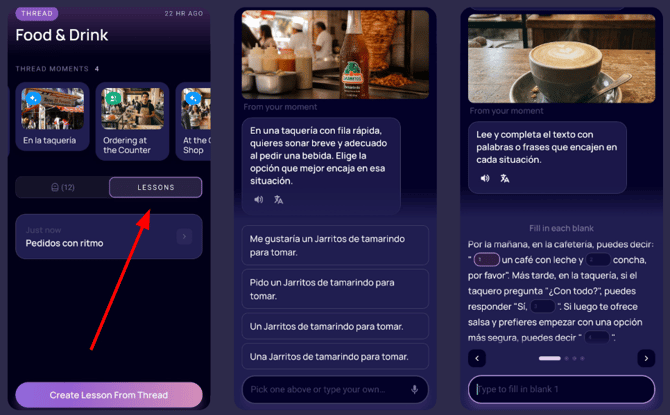
After completing a generated Lesson, it saves within the Moment or Thread so you can revisit the same prompt. For Threads, adding more artifacts to the topic gives the lesson more data each time you retake it.
- Navigate to Capture
- View a Moment or Thread
- Click the Lessons (Book icon) tab
- Select the Lesson you want to revisit
- Click Continue to re-do the Lesson
⚠️ Note: Generated lessons do not save your transcript or extract artifacts. Revisiting a lesson restarts the experience from the beginning.
Lesson Types
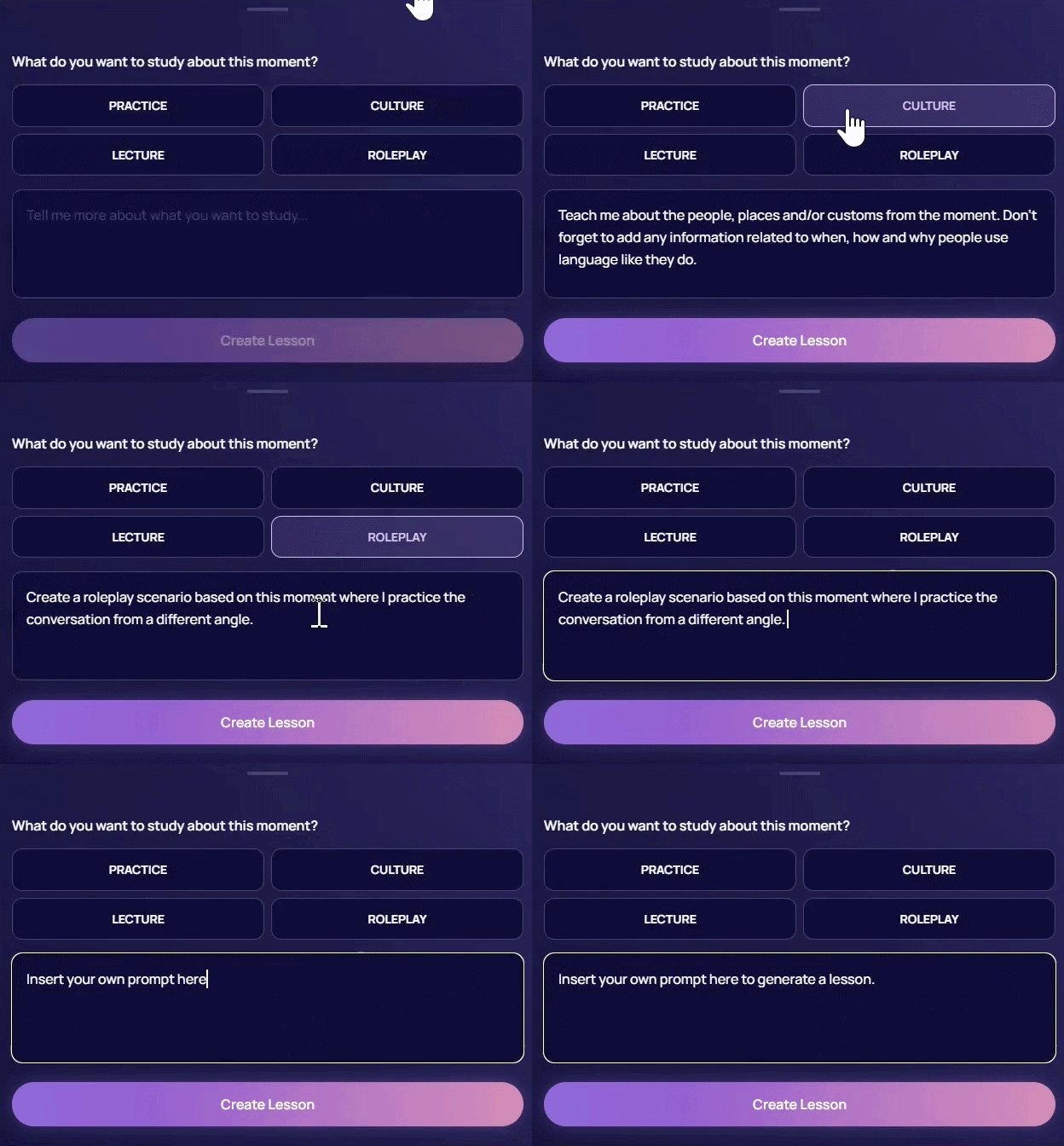
Choose from four pre-prompted lesson types to practice essential vocab, explore grammar in context, dive into culture, or roleplay a similar scenario — all grounded in interactions you've actually had.
- Practice — Build your skills with guided vocab and grammar exercises such as:
- Multiple Choice
- Fill-in-the-blank
- Sentence Ordering
- Direct Open-Response Questions
- Culture — Explore real-world customs, behaviors, sites, and ways people communicate.
- Lecture — Learn more with your AI Tutor. A mini-lecture that covers the key communicative function of the moment.
- Roleplay — Put your skills to the test in an AI conversation.
Prompting
Selecting a lesson type for a Moment or Thread inserts a preset prompt that guides the AI on the lesson type. You can edit these prompts by clicking the prompt box and adding details. If these options don’t address what you want to study, you can insert your own prompt to build a lesson. We encourage you to use AI to generate a strong prompt before creating a lesson to maximize your experience.
Custom Prompt Ideas
- Subjunctive triggers: Identify any subjunctive triggers in this moment (expressions of doubt, emotion, desire, impersonal expressions). Quiz me on when to switch from indicative to subjunctive using sentences inspired by the conversation.
- Preterit vs. imperfect drill: Using the verbs from this moment, generate a mixed practice set where I choose between preterit and imperfect, with a short explanation after each item tied to the context (completed action, background description, habitual past, interruption).
- Regional slang map: For the topic of this moment, show me how speakers in Mexico, Spain, Argentina, and Colombia would say it differently. Include any slang or filler words native speakers actually use.
- Idiomatic expressions: Teach me 3 to 5 idioms or set phrases native speakers commonly use in this kind of situation, with literal vs. actual meaning and an example for each.
- Mastering connectors: Teach me the connector words that would make my speech in this kind of moment sound more fluent and less choppy.
- Filler words and natural speech: Teach me the discourse markers and filler words native speakers use in this kind of conversation so I sound less textbook.
- Raise the stakes: Replay this scenario but with a complication (the other person is upset, in a hurry, doesn't understand me, or disagrees). Force me to negotiate, clarify, or de-escalate.
- Switch roles: Run the same conversation but I play the other person. Push me to use the vocabulary and structures from the original moment.
Lesson Settings
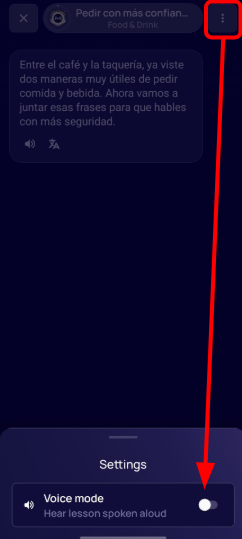
Just like with Self-Paced lessons on the Learning Path, you can choose to hear the lesson spoken aloud, or remain in read-only mode.
Once inside a lesson:
- Click > the 3-dot Menu at the top right to open settings
- Click > the toggle on/off
ℹ️ To change the voice of your AI tutor, please visit your profile settings. For additional support view Configuring In-App Audio Settings.
Frequently Asked Questions
Can I delete Lessons I created and no longer want?
No, not at this time. You would need to delete the entire Moment - which would also erase any associated Artifacts.
Is there a limit to how many Lessons I can create from a Moment or Thread?
No, create as many as you’d like.
Can I complete a lesson created on mobile from my AI Glasses?
No, not at this time. You can only complete the lesson you created from your mobile device.
Can I retake a lesson I created on mobile from the web and vice versa?
No, not at this time. Currently, everything within the Capture feature stores locally on the device used for capture so Moments captured on mobile (and the lessons created from them) will not be available on the WebApp. We are working to enable reciprocal access in a future update.
❓Have a question or trouble creating personalized lessons? Contact us at support@immerse.com.