
Table of Contents
Viewing Progress on Mobile & Web
Taking the Level Up Assessment
> Level Completion Certificates for Corporate Learners
Viewing Progress on Mobile & Web
Aside from Lesson completion indicators on the Learning Path, all progress tracking happens within your Profile. It’s here that you’ll be able to view:
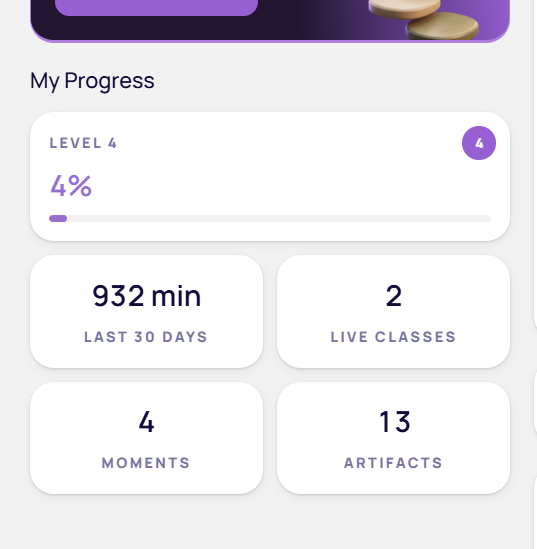
Level Progress = % Self-Paced (AI) Lessons Completed
Your individual level progress as a percentage. This percentage reflects the amount of Self-Paced Lessons you have completed in your current level.
Live Classes Completed
The total number of Live Classes you have completed in IMMERSE from all levels. This metric is not included in your Level Progress percentage.
Time Spent Learning (for Corporate Learners Only)
Your total accumulated time spent within IMMERSE in the last 30 days.
Moments Captured
The number of moments you’ve captured using the Capture feature.
Artifacts Accumulated
The number of different artifacts you’ve gathered across all captured moments. See: Reviewing Artifacts & Threads
Viewing Progress in VR
Your Homeroom gives you enhanced visibility into your progress, separating different learning types for a clearer understanding of your achievements. You'll see self-paced lessons and live classes displayed individually, giving you a more accurate and motivating view of your growth.
From the Home Tab
On your Home page, you'll find distinct metrics that provide a comprehensive overview of your learning — the same ones visible in the Profile icon on the Mobile and Web apps.
⚠️ Note: Learners with an Essential subscription will not see this page in the Homeroom.
Level Progress = Self-Paced (AI) Lessons Completed
Your individual level progress as a percentage. This percentage reflects the amount of Self-Paced Lessons you have completed in your current level.
Live Classes Completed
The total number of Live Classes you have completed in IMMERSE from all levels. This metric is not included in your Level Progress percentage.
ℹ️ No Class Access?
Learners with restricted access to Live Classes will not see this progress metric. This way, learners of different access levels can still complete the full Level Progress.
Time Spent Learning (for Corporate Learners Only)
This metric shows the total accumulated time in the last 30 days across both your self-paced lessons and live class activities, providing a motivating progress figure.
From the Learning Path
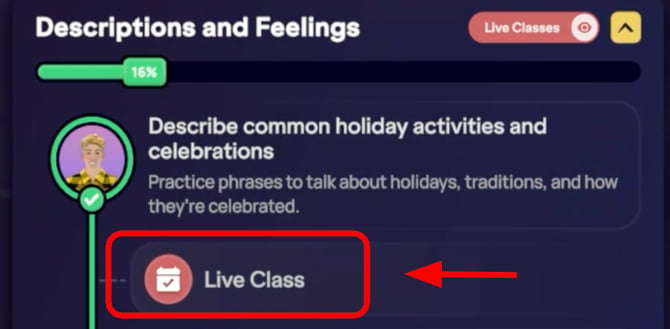
The Learning Path now visually represents your progress through each individual section on a vertical progression from top to bottom.
Section Progress
Each section of the Learning Path includes a green progress bar at the top, which visually represents your overall progression through that section.
Live Class Completion
If you have access to Live Classes, you will see the classes you completed in each section indicated by a red “checkmark" once the Live Classes toggle has been. Reminder: Live Classes don't count towards your overall level progress percentage.
ℹ️ Your profile section also provides details on your overall progress and allows for management of your learning journey.
Taking the Level Up Assessment
The Level Up assessment is a tool designed to ensure you are learning at the most appropriate level for your skills. Feel free to take the assessment as many times as you need. There are currently no limits on attempts or required waiting periods between them.
Location
The Level Up Assessment can be found on your profile page at any time but will also be presented to you at the bottom/end of each level once you complete 80% of the Self-Paced Lessons at your level
Design
The level Up Assessment is designed to indicate to you when you are ready for the next levels material. The assessment contains 4 main parts:
-
Intro
-
1 question asked
-
You will speak/type best response whenever ready
-
-
Interview #1
-
2 questions asked
-
10 second recording countdown to prepare to speak
-
You have up to 60 seconds to submit a spoken response (no typing)
-
-
Interview #2
-
2 questions asked
-
10 second countdown to prepare to speak
-
You have up to 60 seconds to submit a spoken response (no typing)
-
-
Roleplay
-
5-6 questions will be asked back and forth about a topic of the roleplay
-
You will be able to type or voice record your responses
-
Processing Your Results
Need More Practice
If the assessment determines you’re not quite ready to level up, you’ll be given some recommendations for which areas you can improve in before coming back to try again. You will be prompted to return to your Homeroom.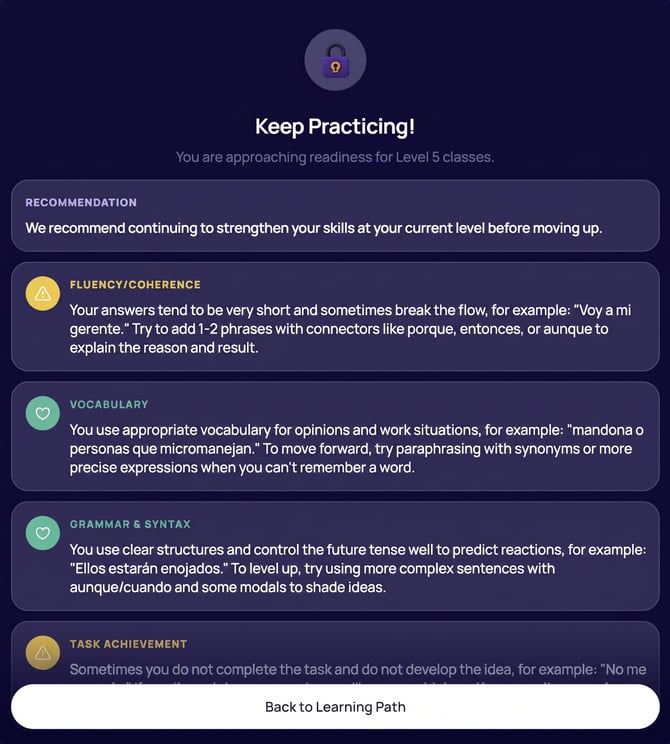
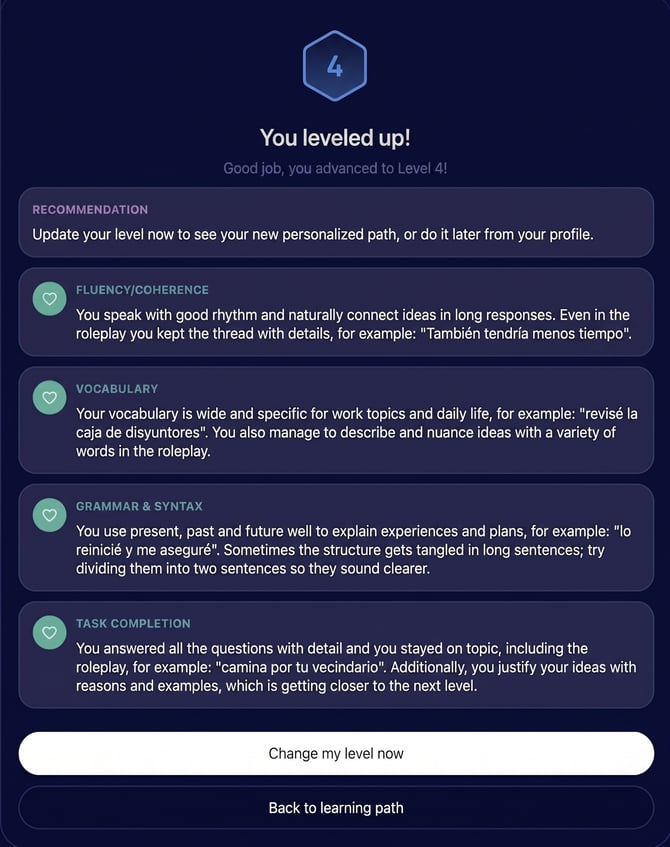
You Are Ready
Once you pass you will be given the option to automatically update your curriculum by clicking > Change Now, which will instantly adjust your Homeroom to the new level.
ℹ️ Changing Your Level Anytime
If you want, you can choose to return to your Homeroom and manually change your level from your profile section at a later time regardless of your results. Note: Some corporate accounts will have an institutional level lock that prevents changes this setting yourself. Please contact your Program Administrator for assistance.
🎓 Level Completion Certificates (PDF) for Enterprise Learners
After passing your level-up assessment, you’ll receive a PDF Certificate of Level Completion via email from noreply@info.immerse.online. This certificate is officially signed by IMMERSE’s Chief Learning Officer, Misty Wilson, Ed.D, and recognizes the progress you’ve made in your language learning journey.
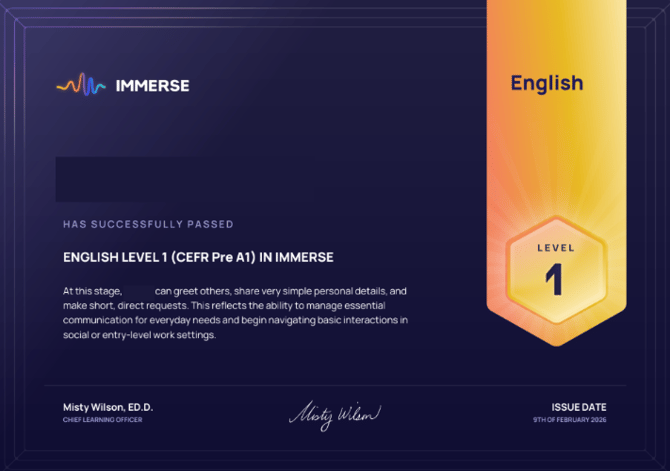
Why this certificate matters for corporate learners:
- Provides formal documentation of your completed level and demonstrated language skills
- Clearly outlines the competencies you gained by passing the assessment
- Can be used as proof of progress for internal training records, performance reviews, or professional development tracking
- Serves as a tangible milestone within your company’s learning program
📣 Share your achievement
We encourage you to celebrate your progress! Feel free to share your certificate on social media and tag IMMERSE so we can cheer you on.
⚠️ No Level Up Assessment is available after completing the final level of a language program at this time. Therefore Level Completion certificates will not automatically be available for enterprise learners completing the following levels:
- English Level 6
- Spanish Level 5
- Portuguese Level 5
- French Level 4
Please reach out to the Support team for assistance if you've completed once of these levels.
❓ Something doesn’t look right?
If there’s an issue with your certificate (missing details, incorrect level, or you didn’t receive it), please reach out to your program administrator or contact IMMERSE Support, and we’ll be happy to help.
Frequently Asked Questions
Why are level completion certificates not available for individual subscribers?
-
Currently, this feature is available only to learners with enterprise institution contracts. If you want it released for the general public, please submit feedback through our support beacon on the Help Center.
❓Questions about tracking progress or leveling up? Contact our support team directly at support@immerse.com.