
Table of Contents
> Creating Lessons from Threads
Capturing moments with IMMERSE generates insights that fuel your fluency and lets you create personalized lessons. These insights include Artifacts that build knowledge and highlight key learning points, and Threads that reveal patterns across your experiences.
Artifacts
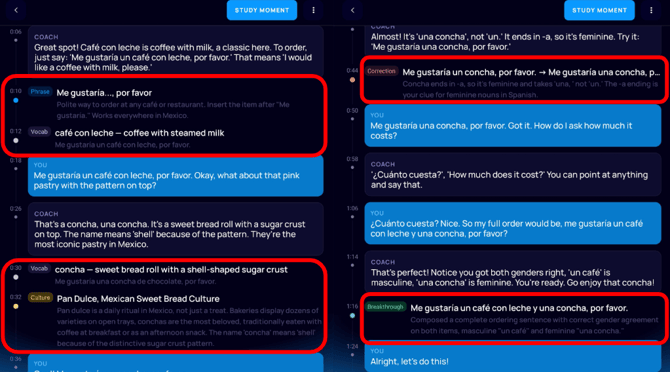
Artifacts comprise a personal glossary that is curated from the Moments in your collection. It includes vocabulary, phrases, cultural notes, breakthroughs, and corrections. Each artifact links to its source Moment and transcript timestamp.
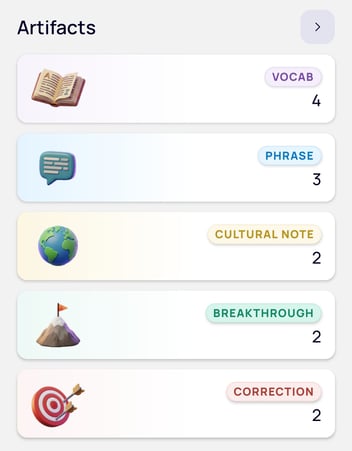
- Vocab: Individual words you used, avoided, or misused during the interaction
- Phrase: Multi-word chunks, including idioms, collocations, and expressions.
- Cultural Note: Observations on culture or pragmatics related to the interaction, including what you did versus cultural expectations.
- Breakthrough: Positive performance signals such as fluency markers (connectors, self-repairs) and moments when you successfully used functional language or appropriate register. Evidence of growth.
- Correction: Errors that affected meaning during your interaction, including register mismatches (e.g., casual language in a business setting).
Ways to Review Artifacts
Standalone
- Navigate to the Capture feature on mobile or browser.
- Under Artifacts:
- Click the gray arrow to view all artifact types
- Click the category of artifact to view all artifacts of that type.
- Click on a card to view additional details about the Artifact
- Click the Origin card on the details page to go to the transcript where the artifact originated
Within a Moments' Transcript
- Under the Moments section, click > View All
- Select the Moment you want to review
- Click View Moment
- Review the Transcript
- Click into Artifacts as they appear within the transcript to discover more details, such as related expressions, what Thread they’re connected to, and if they appear in other Moments you’ve captured.
Threads
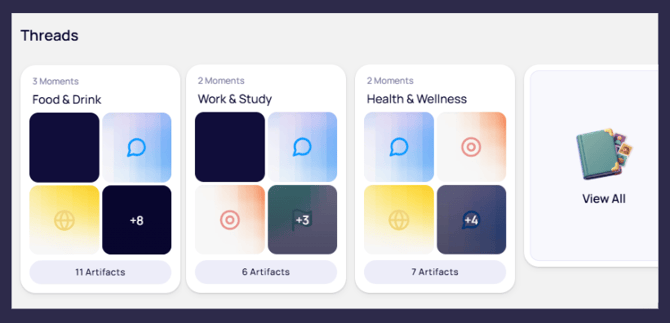
As you capture more Moments, patterns emerge. IMMERSE connects these patterns by linking together related Artifacts and displays them as threads, revealing themes in your learning. Once you click inside a Thread, you’ll see the Moments listed at the top followed by Artifacts grouped by type.
Creating Lessons from Threads
Just as you can create lessons based on individual Moments, you can create lessons based on Threads. As you accumulate more Moments and Artifacts in each Thread, practice content will expand - so be sure to revisit Threads regularly to generate new personalized lessons!
ℹ️ Learn More: Creating Personalized Lessons
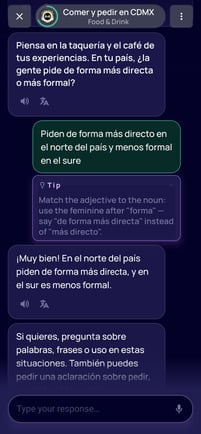 <- "Culture" Lesson created from a Food & Drink Thread
Frequently Asked Questions
Can I delete artifacts or threads?
No, not at this time - not selectively at least. Only entire Moments can be deleted which removes the associated artifacts.
Can I add artifacts to my Saved Notes?
No. They are only available within the Capture feature at this time.
💡 If these are features you’d be interested in, please submit an Existing Feature Improvement Request form through our Support Beacon.
Are artifacts and threads linked to the level my account is set to?
No. All Memories, Artifacts, and Threads are saved together under the Capture tab regardless of your account level during or after the capture.