
Table of Contents
SimulationsAbout You
Translation Improvements
Coach on Web
Bug Fixes & Improvements
For Program Administrators
🚀 What's New in IMMERSE
This update brings Simulations to IMMERSE. You can now practice real-world conversations with a live AI character on web, iOS, and Android. There is also a new About You section in your profile, Hindi as a translation language, and a refreshed Coach on web. Here's everything that's new.
🎭 Simulations
Practice a real-world conversation, like a procurement meeting, with a live AI character. Simulations are a new section next to the Learning Path on web, iOS, and Android.
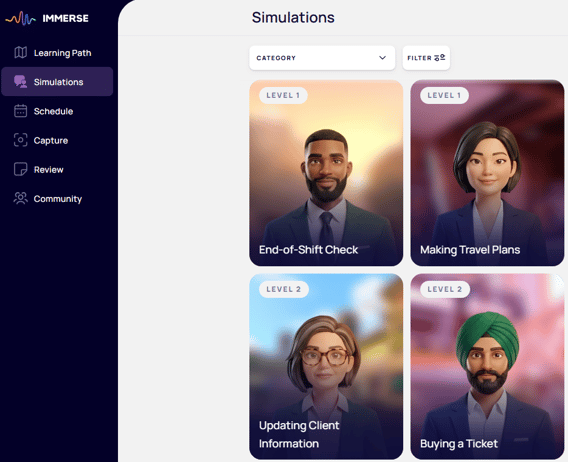
- Each simulation gives you a role, a goal, and a short list of tasks to complete in the conversation. The task list opens at the start of every session, and hints are one tap away.
- Before you start, you can adapt a simulation to your own role and industry. Tap Edit, make your changes, and then tap Apply to rebuild the scenario.
- Each character appears as a live, animated avatar in front of its own background, in the simulation list and in the conversation.
- The session ends when you complete every task, or when you tap the End button.
- After each attempt, a results screen walks back through your conversation. Each turn that needs work gets a short note with the correction and other ways to say it. You also see your stats: tasks, words, turns, and time.
- Simulation titles and goals appear in your language once they are translated, and in English until then.
💭 Is this available to me?
All learners across all subscription plans (both B2B and D2C) will have access to Simulations at launch. Daily limits may apply, depending on your contract and plan. If you reach a limit, you see a message.
👤 About You
A new section of your profile lets you share your role, your industry, why you are learning, and a little about your work. Simulations and other AI features use this to personalize your conversations.
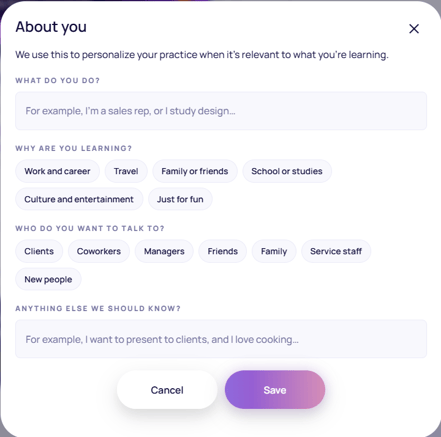
- Every field is optional
- You see a prompt the first time, and you can skip it
- If your institution already sets your industry, the industry field is hidden
🌍 Translation Improvements
- Hindi is now available as a translation language on web, iOS, and Android
- Translations now appear in a bubble that fits the text and stays next to the sentence it translates. If a translation fails, you see a clear message.
🎙️ Coach on Web
Coach on web now matches the Simulations layout:
- Video on the left and the conversation on the right
- A View hints bar
- A red End button
- A timer on the video
🛠️ Bug Fixes & Improvements
We've resolved several issues across the platform for a smoother experience:
VR Fixes:
This fix is already live from the VR update on November 4th. No new VR app download is needed for this release.
- If you join a session late, you no longer see half-built objects, such as the raft, shelter, chair, Westin puzzle, or vending machine
Web & Mobile Fixes:
- Country flag icons display correctly again, including China, Korea, India, the US, and Mexico
🧑💼 For Program Administrators
A few updates for those managing IMMERSE for their teams:
- Learner Progress now shows how many simulations each learner has completed, and the export has a new Simulations Completed column. A simulation counts as completed only when the learner meets every task in it. Time spent in simulations counts toward time on platform under "Other".
- You can now export the Learners page to Excel for a custom date range
- Live lesson times in the Schedule tab no longer show a UTC offset, because times already appear in your time zone
- Bulk importing learners no longer fails when a target or native language is not set
- The Level column in bulk upload now uses readable level names instead of internal IDs
- The bulk invite pop-up now links to the new CSV template
- New HR Admins who have not logged in yet can now reset their password
- Sales AE users can see customer-level data in the Insights assistant again
- For users who are both a Sales AE and an HR Admin, the Add Learner form now pulls custom fields from the right institution
📌 Need help or have questions?
Reach out anytime at support@immerse.com or contact your Account Executive.